FRESHMEN
Freshman Year students are introduced to Adobe programs and Creative Cloud skills. We work on basic skills developing raster and vector projects. Students work on iPads using Procreate, and understanding how to transfer art into different devices. We work on Apple iMac computers creating posters, icons, GIFs, and advertising designs.
Adobe Illustrator - Iron Giant

Designers learn how to create and edit shapes in Adobe Illustrator based on the "Iron Giant" movie.


Typography- Intial Letters
Students work in Adobe Illustrator to develop skills in manipulating fonts and shapes, using tools such as the Pathfinder panel to combine, subtract, and intersect objects. Through these exercises, they gain a clear understanding of positive and negative space, learning how to balance composition and create visually compelling designs.


Elements of Art - texture


In this project, students explored the element of texture in art by drawing an image of a hand and adding varied textures to each finger. Each finger was designed to represent a different feeling or substance, allowing students to experiment with tactile qualities, visual interest, and expressive representation. This exercise reinforced how texture can communicate emotion and meaning in a design.


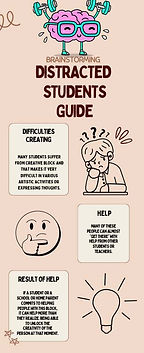
Brainstorming Infographics using the Design Thinking Method
In user experience (UX) design, students follow a structured design thinking process to create effective solutions. The steps include: Empathize and Understand, to gain insight into users’ needs; Define and Reframe a Problem, to clarify challenges; Ideate and Experiment, to generate creative solutions; and Collaborate and Communicate, to refine ideas and share them effectively. This project allowed students to create an infographic to explain the benefits of Brainstorming.



Used Car Flyer
Utilizing Photoshop techniques and layout skills students create an amusing used car flyer using creative


Color Wheel
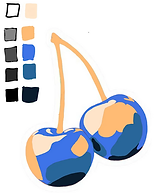
Adobe Illustrator Fruit Art
Apply an understanding of the color wheel and its parts, including primaries, secondaries, tertiaries, compliments, and color schemes, by editing a fruit.



Klimt Project
In this project, students created a poster inspired by the work of Gustav Klimt, focusing on the use of texture and traditional art techniques. Students explored layering, patterning, and decorative elements to emulate Klimt’s signature style while incorporating their own creative interpretations. The project emphasized attention to detail, experimentation with mixed media, and the integration of visual texture to enhance design.


